

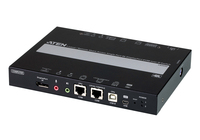
ATEN Altusen CN9950 - Remote control device
1-Local/Remote Share Access Single Port 4K DisplayPort KVM over IP Switch
Brand: ATEN
SKU: CN9950
$767.88
Price as listed. Shipping charges calculated at checkout.
In stock

Do you have any question about this product or its specs? Want to know more? Click here to contact our pre-sales consultant and make the right purchase.
 NOTE: The information below is provided for your convenience only; the accuracy of the specifications cannot be guaranteed. However, if necessary, please check with us before purchasing. Data provided by 1 World Sync.
General
Keyboard port type
USB
Mouse port type
USB
Video port type
DisplayPort
HD type
4K DCI
Maximum resolution
4096 x 2160 pixels
Video bandwidth
30 Hz
Product colour
Black
Housing material
Metal
Power source
DC
DC input voltage
5 V
Power consumption (typical)
9.76 W
Width
149.3 mm
Depth
200 mm
Height
28.5 mm
ATHENS CN9950. Keyboard port type: USB, Mouse port type: USB, Video port type: DisplayPort. HD type: 4K DCI, Maximum resolution: 4096 x 2160 pixels, Video bandwidth: 30 Hz. Product colour: Black, Housing material: Metal. Power source: DC, DC input voltage: 5 V, Power consumption (typical): 9.76 W. Width: 149.3 mm, Depth: 200 mm, Height: 28.5 mm
| Estimate Gross Weight | 1.444 |
|---|
https://www.aten.com/global/en/products/kvm/kvm-over-ip-switches/cn9950/
The CN9950 KVM over IP Switch allows for remote access to video, audio, and virtual media of a PC or workstation, and features DisplayPort high-definition video with resolutions of up to 4K DCI (4096 x 2160) @ 30 Hz at both the local and remote consoles. Built with an advanced FPGA graphics processor, the CN9950 offers better image and video quality to enhance the user experience, while also meeting the RS-232 standards for serial control.
For user-friendly operation, a mini USB port on the front panel is designed as a Laptop USB Console (LUC) port for connection to a laptop, which allows the user to access the PC/server for easy routine maintenance without requiring an additional monitor, keyboard, and mouse.
To ensure seamless connectivity, the CN9950 is equipped with dual LAN and dual power functionality to keep operations in the server room smooth and efficient. Its power status detection function automatically sends out event notifications when the devices are offline (e.g. power failure) for device status monitoring. Moreover, the CN9950 features a 5-pin Relay / DI (digital input) terminal block allowing for remote reboot of the local server, and receiving digital input from a connected input/alarm device for notification of critical events.
For ease of remote management, the CN9950 WebClient Viewer supports remote desktop access without additional software applications. The DisplayPort 4K KVM over IP Switch provides a web-based GUI for remote access and management. In addition, a unified multi-language interface can minimize user training time and increase productivity.
The CN9950 is ideal for data centers, server rooms, and control rooms for remote access management in industries with requirements for high-quality images and multitasking, such as global organizations and companies with several office locations where it can function as a bridge between local and remote workplaces.
The CN9950 KVM over IP Switch allows for remote access to video, audio, and virtual media of a PC or workstation, and features DisplayPort high-definition video with resolutions of up to 4K DCI (4096 x 2160) @ 30 Hz at both the local and remote consoles. Built with an advanced FPGA graphics processor, the CN9950 offers better image and video quality to enhance the user experience, while also meeting the RS-232 standards for serial control.
For user-friendly operation, a mini USB port on the front panel is designed as a Laptop USB Console (LUC) port for connection to a laptop, which allows the user to access the PC/server for easy routine maintenance without requiring an additional monitor, keyboard, and mouse.
To ensure seamless connectivity, the CN9950 is equipped with dual LAN and dual power functionality to keep operations in the server room smooth and efficient. Its power status detection function automatically sends out event notifications when the devices are offline (e.g. power failure) for device status monitoring. Moreover, the CN9950 features a 5-pin Relay / DI (digital input) terminal block allowing for remote reboot of the local server, and receiving digital input from a connected input/alarm device for notification of critical events.
For ease of remote management, the CN9950 WebClient Viewer supports remote desktop access without additional software applications. The DisplayPort 4K KVM over IP Switch provides a web-based GUI for remote access and management. In addition, a unified multi-language interface can minimize user training time and increase productivity.
The CN9950 is ideal for data centers, server rooms, and control rooms for remote access management in industries with requirements for high-quality images and multitasking, such as global organizations and companies with several office locations where it can function as a bridge between local and remote workplaces.
- Supports DisplayPort resolution up to 4K DCI (4096 x 2160) @ 30 Hz at both the local and remote consoles
- A mini USB port in the front panel can serve as a Virtual Media USB port or a Laptop USB Console (LUC) port
- Compact and slim design for space utility optimization
- Supports 5-pin Relay/DI Terminal for environment monitoring and remotely reboot control
- Provides an FPGA graphics processor for better image quality
- Two 10 / 100 / 1000 Mbps NICs for redundant LAN or two IP operation
- Dual power supply and dual LAN for backup
- Provides over IP capability to DisplayPort KVM switches without over IP functionality
- Allows access to the CN9950 via a built-in serial viewer, or via third-party software (such as PuTTY) for Telnet and SSH sessions
0.0
0 review(s)
Inside NetworkDistri
From our network to yours.
Every day, technology moves through our operation — received, checked, prepared and dispatched to customers. The images below show real equipment handled through our operation, not stock photography.
Real operations
Technology we actually handle
01
Source
Global supply
02
Receive
Goods arrive
03
Prepare
Process & pack
04
Dispatch
On the way





































