

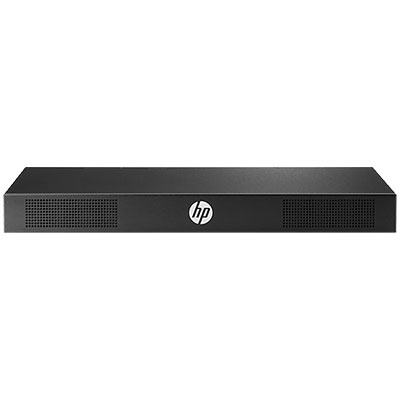
KVM Console G3 Switch 0x2x16 - KVM switch - USB - CAT5 - 16 x KVM ports - 2 local users - rack-mountable
0x2x16 G3 KVM Console Switch - 256 servers (Max) - 16 ports - 2users - Black
Brand: HPE
SKU: AF652A
$2,505.60
Price as listed. Shipping charges calculated at checkout.
Out of stock

Do you have any question about this product or its specs? Want to know more? Click here to contact our pre-sales consultant and make the right purchase.
 NOTE: The information below is provided for your convenience only; the accuracy of the specifications cannot be guaranteed. However, if necessary, please check with us before purchasing. Data provided by 1 World Sync.
General
Number of users
2 user(s)
Product colour
Black
Width
438 mm
Depth
43.6 mm
Height
165.1 mm
Hewlett Packard Enterprise AF652A. Number of users: 2 user(s). Product colour: Black. Width: 438 mm, Depth: 43.6 mm, Height: 165.1 mm
| Estimate Gross Weight | 4.828 |
|---|
https://www8.hp.com/us/en/products/rack-console-switches/product-detail.html?oid=6900303#%21tab=features
Knowledge is power with HPE KVM. Looking for a simple and intuitive solution that allows you to access and manage servers in your data center? HPE KVM Analog Console Switches allow you to view and manage up to 256 rackmount servers through a single user interface.
KVM Analog Console Switches utilize a local On-Screen Display (OSD) interface, accessed through a rack console such as the HPE LCD8500, that provides intuitive menus for accessing each attached server or serial managed device. HPE KVM Analog Console Switches support an optional USB Remote Access Key that allow you to upgrade to KVM-over-IP functionality, providing remote access and management via the On-Board Web Interface (OBWI).
Available in 4, 8 and 16-Port models. Standard rack mounting of the KVM Console Switch will share 1U (1.75-inch) of front panel rack space with the rack console.
However, each model can also be mounted in a "zero U" profile by mounting in the side rails of the rack.
What's new
KVM Console Interface Adapter supporting USB and Display Port connectivity
Features
View and Manage up to 256 Servers through a Single User Interface
HPE KVM Analog Console Switches utilize a local On-Screen Display (OSD) that provides access to system-related information such as selected server name, status, power-up test data and configuration menus.
G3 models support an optional USB Remote Access Key that allow you to upgrade to KVM-over-IP functionality, providing remote access and management via the On-Board Web Interface (OBWI).
Includes Programmable Scanning, a utility that allow you to evaluate system performance by sequentially scanning any or all servers managed through the console switch.
4-Port, 8-Port and 16-Port Models with Multiple Installation and Server Connection Options
HPE KVM Analog Console Switches include mounting hardware that support ΓÇ£Zero UΓÇ¥ installations on both the side and rear of standard IT racks, saving valuable space within your racks.
Supports a variety of server connections with interface adapters for PS/2, USB, and VT 100 (serial console support), as well as HPE BladeSystems support via the front diagnostics connector.
Secure manageability
For protection against unauthorized users, HPE KVM Analog Console Switches provide a password option for security purposes.
Features support for HPE Location Discovery Services (LDS) and Power Discovery Services (PDS) support when connected to an HPE Intelligent Power Distribution Unit (iPDU) and the HPE LCD8500 1U Rackmount Console Kit (HPE Location Discovery Services LCD8500 Kit required).
Knowledge is power with HPE KVM. Looking for a simple and intuitive solution that allows you to access and manage servers in your data center? HPE KVM Analog Console Switches allow you to view and manage up to 256 rackmount servers through a single user interface.
KVM Analog Console Switches utilize a local On-Screen Display (OSD) interface, accessed through a rack console such as the HPE LCD8500, that provides intuitive menus for accessing each attached server or serial managed device. HPE KVM Analog Console Switches support an optional USB Remote Access Key that allow you to upgrade to KVM-over-IP functionality, providing remote access and management via the On-Board Web Interface (OBWI).
Available in 4, 8 and 16-Port models. Standard rack mounting of the KVM Console Switch will share 1U (1.75-inch) of front panel rack space with the rack console.
However, each model can also be mounted in a "zero U" profile by mounting in the side rails of the rack.
What's new
KVM Console Interface Adapter supporting USB and Display Port connectivity
Features
View and Manage up to 256 Servers through a Single User Interface
HPE KVM Analog Console Switches utilize a local On-Screen Display (OSD) that provides access to system-related information such as selected server name, status, power-up test data and configuration menus.
G3 models support an optional USB Remote Access Key that allow you to upgrade to KVM-over-IP functionality, providing remote access and management via the On-Board Web Interface (OBWI).
Includes Programmable Scanning, a utility that allow you to evaluate system performance by sequentially scanning any or all servers managed through the console switch.
4-Port, 8-Port and 16-Port Models with Multiple Installation and Server Connection Options
HPE KVM Analog Console Switches include mounting hardware that support ΓÇ£Zero UΓÇ¥ installations on both the side and rear of standard IT racks, saving valuable space within your racks.
Supports a variety of server connections with interface adapters for PS/2, USB, and VT 100 (serial console support), as well as HPE BladeSystems support via the front diagnostics connector.
Secure manageability
For protection against unauthorized users, HPE KVM Analog Console Switches provide a password option for security purposes.
Features support for HPE Location Discovery Services (LDS) and Power Discovery Services (PDS) support when connected to an HPE Intelligent Power Distribution Unit (iPDU) and the HPE LCD8500 1U Rackmount Console Kit (HPE Location Discovery Services LCD8500 Kit required).
0.0
0 review(s)
Inside NetworkDistri
From our network to yours.
Every day, technology moves through our operation — received, checked, prepared and dispatched to customers. The images below show real equipment handled through our operation, not stock photography.
Real operations
Technology we actually handle
01
Source
Global supply
02
Receive
Goods arrive
03
Prepare
Process & pack
04
Dispatch
On the way





































