

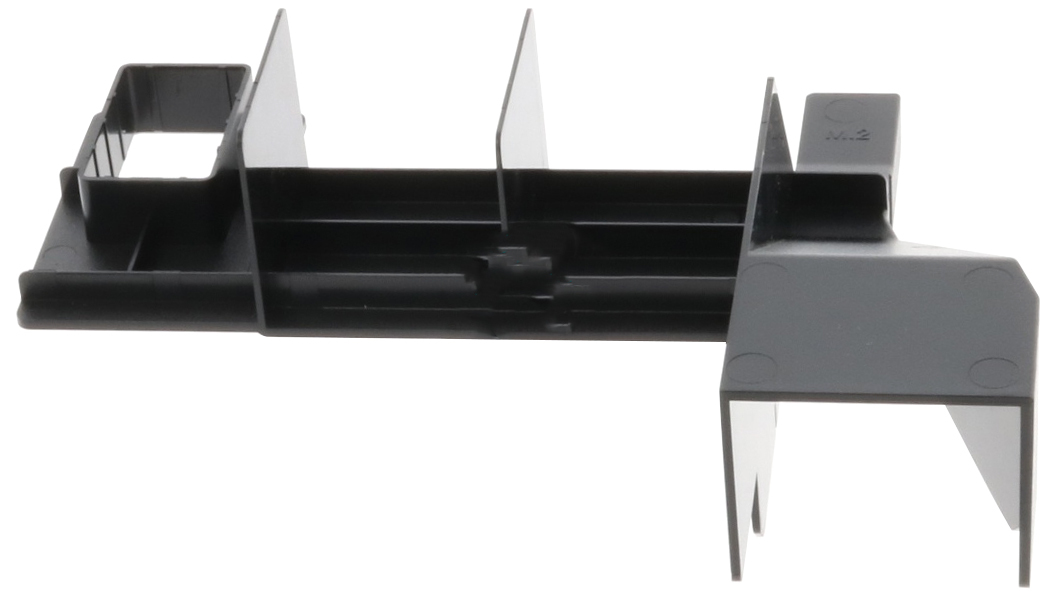
Lenovo Thermal Kit Air Deflector (4XH7A08791)
ThinkSystem M.2 480GB SSD Thermal Kit
Brand: Lenovo
SKU: 4XH7A08791
$131.88
Price as listed. Shipping charges calculated at checkout.
In stock

Do you have any question about this product or its specs? Want to know more? Click here to contact our pre-sales consultant and make the right purchase.
 NOTE: The information below is provided for your convenience only; the accuracy of the specifications cannot be guaranteed. However, if necessary, please check with us before purchasing. Data provided by 1 World Sync.
General
Product colour
Black, Blue, Green
Lenovo 4XH7A08791. Product color: Black, Blue, Green
| Estimate Gross Weight | 0.35 |
|---|
https://lenovopress.com/lp0769-thinksystem-m2-drives-adapters
M.2 is a solid-state drive (SSD) form factor primarily used as an operating system boot solution. Lenovo ThinkSystem servers support M.2 drives either with the addition of a upported M.2 adapter or directly on the system board.
On the ThinkSystem SR150, SR250 and ST250, a single M.2 drive is installed directly on the system board.
On all other support ThinkSystem servers, the M.2 drives install into an M.2 adapter which in turn is installed in a dedicated slot on the system board of the server. With two M.2 drives configured, the drives are configured by default as a RAID-1 mirrored pair for redundancy.
- Single M.2 Adapter, which supports one M.2 drive; available as the ThinkSystem M.2 Enablement Kit
- Dual M.2 Adapter, which supports one or two M.2 drives; available as the ThinkSystem M.2 with Mirroring Enablement Kit
A Dual M.2 Adapter with one 128GB M.2 drive partially inserted is shown in the following figure. The second M.2 drive is installed on the other side of the adapter.
M.2 is a solid-state drive (SSD) form factor primarily used as an operating system boot solution. Lenovo ThinkSystem servers support M.2 drives either with the addition of a upported M.2 adapter or directly on the system board.
On the ThinkSystem SR150, SR250 and ST250, a single M.2 drive is installed directly on the system board.
On all other support ThinkSystem servers, the M.2 drives install into an M.2 adapter which in turn is installed in a dedicated slot on the system board of the server. With two M.2 drives configured, the drives are configured by default as a RAID-1 mirrored pair for redundancy.
- Single M.2 Adapter, which supports one M.2 drive; available as the ThinkSystem M.2 Enablement Kit
- Dual M.2 Adapter, which supports one or two M.2 drives; available as the ThinkSystem M.2 with Mirroring Enablement Kit
A Dual M.2 Adapter with one 128GB M.2 drive partially inserted is shown in the following figure. The second M.2 drive is installed on the other side of the adapter.
- Hardened boot media that does not use a drive bay
- RAID functionality provided by the M.2 adapter
- RAID 1 by default; also supports RAID 0 and JBOD
- UEFI-based settings to enable/disable RAID mode and to review inventory
- Supports Secure Boot
- Adapter and drive firmware update using Lenovo firmware tools
- Management via I2C interface
- 6 Gbps SATA host interface (connects to the PCH)
- Supports one 6 Gbps SATA M.2 drive**
- Drive firmware update using Lenovo firmware tools
- VPD reporting of adapter inventory
- Both mechanically & electronically designed to be more robust than any prior implementation
- Design provides hardware mirroring of two M.2 SSDs
- M.2 SSDs have higher mean time between failures (MTBF) than SD cards or USB keys
- Tool-less, patented clip design that supports back to back connector layout, providing simple install in limited space
- PCIe 2.0 x2 host interface (connects to the PCH)
- Based on the Marvell 88SE9230 6 Gbps SATA controller
- Supports one or two 6 Gbps SATA M.2 drives**
- Supports 3 different physical sizes of M.2 drives: 42mm (2242), 60mm (2260) and 80mm (2280)*
0.0
0 review(s)
Inside NetworkDistri
From our network to yours.
Every day, technology moves through our operation — received, checked, prepared and dispatched to customers. The images below show real equipment handled through our operation, not stock photography.
Real operations
Technology we actually handle
01
Source
Global supply
02
Receive
Goods arrive
03
Prepare
Process & pack
04
Dispatch
On the way





































